Yesterday during a SAR mission a team member showed me some maps that he had downloaded. The quality was excellent. If you need some maps of the Pacific Crest Trail that are free check this site out. Go here for the site.
Map, Compass & GPS

Wild flowers along Fall Creek on the way to the Green Lakes - Oregon
Saturday, June 22, 2013
Pacific Crest Trail Maps
Free Maps of the Pacific Crest Trail.
Yesterday during a SAR mission a team member showed me some maps that he had downloaded. The quality was excellent. If you need some maps of the Pacific Crest Trail that are free check this site out. Go here for the site.
Yesterday during a SAR mission a team member showed me some maps that he had downloaded. The quality was excellent. If you need some maps of the Pacific Crest Trail that are free check this site out. Go here for the site.


Customizing Your GPS - Part 2
Dan continues with the steps to properly set up a GPS receiver (eTrex30). Everyone in your hiking and hunting group should consider what Dan has to say.
Is your GPS set up correctly?
First Steps

Choose Remove, press the Thumb Stick to select this option and then it will return you to the list of pages. Navigate to another one you want to remove and repeat this process. The pages in the list will depend on your device, however, at a minimum you should KEEP the following pages:

So let’s say that you want quick access to the Compass and the
Map pages. Using the Add Page option, you can add both of those to the list of
pages.

The catch here is that there is no separate page for Mark
Waypoint. This is a very important feature for most GPS users, so if you want
to see it, you would need to add the other eight as separate pages and retain
the Main Menu. Then, when cycling through the pages using the Back button,
you’ll see the Main Menu page in the sequence with only one tile on it—Mark
Waypoint.
Before moving on, if you’re lost in the myriad of pages on
your device, keep pressing the Back button until you get to the Setup page.
Then follow the steps above to reset your settings and after that, re-do your
list of pages so that it looks like the list above. Since the GPS can only
display icons for 6 pages, two screen captures are shown below:

Is your GPS set up correctly?
First Steps
Garmin refers to the square tiles such as Map, Compass,
Calendar, etc. as Pages and the default setting is to show all available pages.
This makes the display unnecessarily crowded and frankly, you will most likely
never use at least 50% of the pages. So let’s clean up our display by hiding a
lot of the superfluous pages. Ultimately it’s up to you as to which pages to
show/hide and remember, you can always add pages back in if you miss them later
on.
To remove a page, select any page and click the Menu button.
This will display a popup that says, “Change Item Order”. Press the Thumb Stick
to select this option and you’ll see a list of all the pages. Navigate to one
that you don’t want (say, Photo Viewer) and press the Thumb Stick again. You’ll
see two options: Move and Remove.Choose Remove, press the Thumb Stick to select this option and then it will return you to the list of pages. Navigate to another one you want to remove and repeat this process. The pages in the list will depend on your device, however, at a minimum you should KEEP the following pages:
1.
Map
2.
Mark Waypoint
3.
Where To?
4.
Compass
5.
Trip Computer
6.
Setup
7.
Waypoint Manager
8.
Track Manager
9.
Profile Change
The pages don’t have to be in that order (if you want, you
can reorder them by using the Move option as shown above and then using the
Thumb Stick to move the page up or down in the list of pages). Those nine pages
should allow you to accomplish 99% of your navigation activities and will
greatly simplify the display of information. Later on we’ll talk about some
tricks that will allow you to see information from some of the pages you
removed without actually having to go to that page.
One last thing about pages before moving on: The list of
pages that you see is actually also a page (no matter which/how many pages
you’ve chosen to display, it is referred to as Main Menu). This can get a bit
confusing, so let’s talk about how this works. The idea here is that you have
your Main Menu of frequently-accessed pages, but you can also quickly cycle
through specific pages just by pressing the Back button. You configure this in
Setup > Page Sequence > Add Page.
Once you’ve done that, navigate back to the Main Menu.
Everything looks like it did before, right? Now click the Back button once.
What happened? Click it again. What do you see now? The first click of the Back
button should’ve taken you to the Compass page, and when you clicked it again,
the Map page should’ve been displayed. To return to the Main Menu, click the
Back button a third time.
Basically, the concept here is that you can create a list of
“Favorites” and then simply change between them by clicking the Back button.
Personally, I’m more a fan of navigating to pages via the Main Menu, but if you
like this method, feel free to add as many pages as you want. In fact, you can
almost entirely do away with the Main Menu page itself by adding all the pages
above as separate pages and then removing the Main Menu (you’ll see this option
in Setup > Page Sequence > Main Menu.
(In case you haven’t already discovered this, you don’t
always have to scroll down through options; you can also scroll up—simply press
up on the Thumb Stick when you’re at the top-most visible option on a screen
and then it will take you directly to the bottom-most option.)
Wednesday, June 19, 2013
Customizing your GPS - Part 1
The following post was written my my fellow SAR team member Dan M. I am going to spread this out over a the next several days. Lots of detail. Enjoy

Choose Yes and this will set all of your menus, options,
etc. to how they were when you first got the unit out of the box.
Interestingly, this does NOT remove any of your previously-created Profiles
(you may not have created any yet, but we’ll be doing so here in just a bit.)
This WILL remove all of your Waypoints, Routes, etc., though, so if there are
any that you haven’t backed up to your computer, be sure to do this before
wiping out your data on the unit.
Like most consumer electronics nowadays, GPS Receivers
(commonly just referred to as “GPS”) come out of the box with many more
features than the average (or even “above-average”) user will ever
need/want/use. The good news is that with a bit of patience, most GPS units can
be customized to simplify the display of information, make the interface more
user-friendly and optimize the use of your device. In this post, we’ll explore
how to accomplish these goals and discuss what this means for your experience
when in the field.
The Garmin eTrex series (10, 20, and 30) is one of the most
popular GPS units for backcountry navigation due to its (relatively) low price,
small size and reliable performance. The examples in this post are all from a
Garmin eTrex 30, so for those of you non-eTrex users (or non-Garmin users), you
may be wondering if you should bother to read on…the answer is “YES!” Although
the screen captures and instructions here will only cover eTrex options, almost
all GPS units allow for some kind of user customization. So even though your
display, menus, etc. may not be exactly the same as what’s presented here, most
of the ideas and concepts should be transferrable to your GPS. Additionally,
this will be a great way for you to familiarize yourself with your GPS
interface and the various options supported by your device’s software.
So, speaking of software, one of the first things you should
do as part of your GPS setup is to check for updated software from your GPS
manufacturer. The process to do this varies between devices and is outside the
scope of this post so we won’t be covering that here. However, the instruction
manual (you still have that, right?) will explain how to do this, or you can
find that information on the manufacturer’s website. Usually you won’t notice a
big difference in the interface after a software update, however there might be
some enhanced functionality for certain features and there will most likely be
bug fixes that address any known issues with your device software.
Starting with a Clean Slate
If you’ve already tweaked your settings and you want to
return everything to the defaults, the easiest way to do this is to go to Setup
> Reset > Reset All Settings.
Wednesday, June 5, 2013
The Ten Essentials
Another look at the Ten Essentials by a King County SAR member.
Glenn Wallace takes another quick look at the Ten Essentials.
Carrying the 10 Essentials when you’re in the outdoors will greatly increase your chances of survival. We recommend you carry them while hiking, hunting, fishing and driving in remote areas. The mistake that many of our rescued subjects make is thinking they will go for a “short day hike” which takes a turn for the worse when they get lost or injured. Being prepared means that when conditions change you have a better chance of survival.
To read the rest of Glenn's post visit the online magazine www.seattlebackpackersmagazine.com - here .
Glenn Wallace takes another quick look at the Ten Essentials.
Carrying the 10 Essentials when you’re in the outdoors will greatly increase your chances of survival. We recommend you carry them while hiking, hunting, fishing and driving in remote areas. The mistake that many of our rescued subjects make is thinking they will go for a “short day hike” which takes a turn for the worse when they get lost or injured. Being prepared means that when conditions change you have a better chance of survival.
To read the rest of Glenn's post visit the online magazine www.seattlebackpackersmagazine.com - here .
Sunday, June 2, 2013
SAR - A Busy Morning
It was busy at Smith Rock State Park (Oregon) Saturday morning. A tough extraction but it ended well.


Saturday, June 1, 2013
The Cold Steel SRK: The Best Survival Knife?
My friend Leon has a strong review about the best survival knife/
You can’t compromise on survival gear quality, so over 20 years ago, I invested in a Cold Steel SRK. If I could only have one survival knife, which would also be used as a field dressing tool for big game and a meat cutting implement, it would be a SRK. Here’s why.
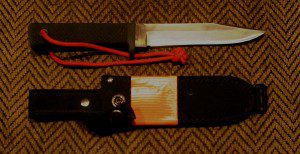
by Leon Pantenburg
After my first Idaho elk hunt in 1990, I had to make some gear changes. My wood-stocked BDL 7mm Remington Magnum caliber went synthetic. I got heavier boots, warmer hunting clothes, better binoculars and a Cold Steel SRK.
To read the rest of Leon's post go here.
You can’t compromise on survival gear quality, so over 20 years ago, I invested in a Cold Steel SRK. If I could only have one survival knife, which would also be used as a field dressing tool for big game and a meat cutting implement, it would be a SRK. Here’s why.
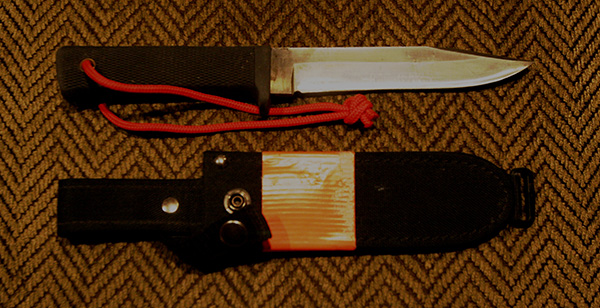
My Cold Steel SRK has had hard use for nearly 20 years and is still my first choice for a survival knife.
by Leon Pantenburg
After my first Idaho elk hunt in 1990, I had to make some gear changes. My wood-stocked BDL 7mm Remington Magnum caliber went synthetic. I got heavier boots, warmer hunting clothes, better binoculars
and a Cold Steel SRK.To read the rest of Leon's post go here.
Bushwacking - Is It Right For You?
Section Hiker has a nice post on bushwacking through the back country.
Bushwhacking is a form of off-trail hiking where you need to navigate through dense
 vegetation to locate you destination. Getting really good at it is an art form that takes years of practice and lots of hikes in all kinds of different terrain.
Bushwhacking is not for everyone and about 90% of the people who try it for the first time hate it. They think it’s insane. Bulldozing through dense spruce that tears up your clothing and gear, scratches your skin, and makes you bleed is not for the faint of heart.
To read the rest of the post go here.
Bushwhacking is a form of off-trail hiking where you need to navigate through dense

Bushwhacking is not for everyone and about 90% of the people who try it for the first time hate it. They think it’s insane. Bulldozing through dense spruce that tears up your clothing and gear, scratches your skin, and makes you bleed is not for the faint of heart.
To read the rest of the post go here.